
The Risk Register
The Risk Register is where your team records and manages the real risks your organisation is carrying — on top of, but separate from, what the analysis computed for you. Each entry is written by a person: a plain-language risk statement, your own assessment of how likely it is and how much it would hurt, the findings and elements from the analysis that back it up, a treatment decision, an owner, a review date, and a reference handle you can quote in a ticket or a board pack.
The register is the one place in the report you author. Everything else — the findings, the coverage numbers, the severity bands, the matrices — is computed from your model and frozen into the report. The register sits alongside those numbers without ever touching them.
This guide walks through the full workflow: authoring a risk, backing it with evidence, recording a treatment, managing reference handles, feeding new evidence to a risk you already wrote, filtering and closing risks, reading the review markers the register raises for you, and working with risks recorded from Threat Patterns.
Authoring never changes your computed report
This is the register's central promise, and it is worth stating before anything else:
Nothing you do in the register changes the computed analysis. Authoring a risk, editing it, linking evidence, or deleting it never moves a single finding, coverage number, or severity band — and it never marks your report out of date.
You can record a hundred risks and your model's computed numbers stay byte-for-byte identical. The amber "your model changed" banner you may have seen elsewhere in the report is about your model changing, never about the register. The register raises its own quiet, information-only markers on the individual risk rows (see When a risk needs review), and those markers never escalate into that banner.
For the reasoning behind this separation — why management-authored judgment is deliberately kept out of the computed numbers — see Methodology and Trust.
Opening the register
The register lives on the Register tab of your model's Risk Assessment report. It holds the risks for that one model.
- Open the Risk Assessment report for your model.
- Select the Register tab.
The register loads on its own when you open the tab. While it is fetching you see Loading the register…; once it lands you see the table of risks, or an empty state if none have been authored yet.
The tab header shows a running count — for example 4 risks · 3 open — followed by a + New risk button. Below the header sit the four filter controls, and below those the risk table itself. Each row is one risk; click a row to expand it and see its evidence, notes, treatment plan, and actions.
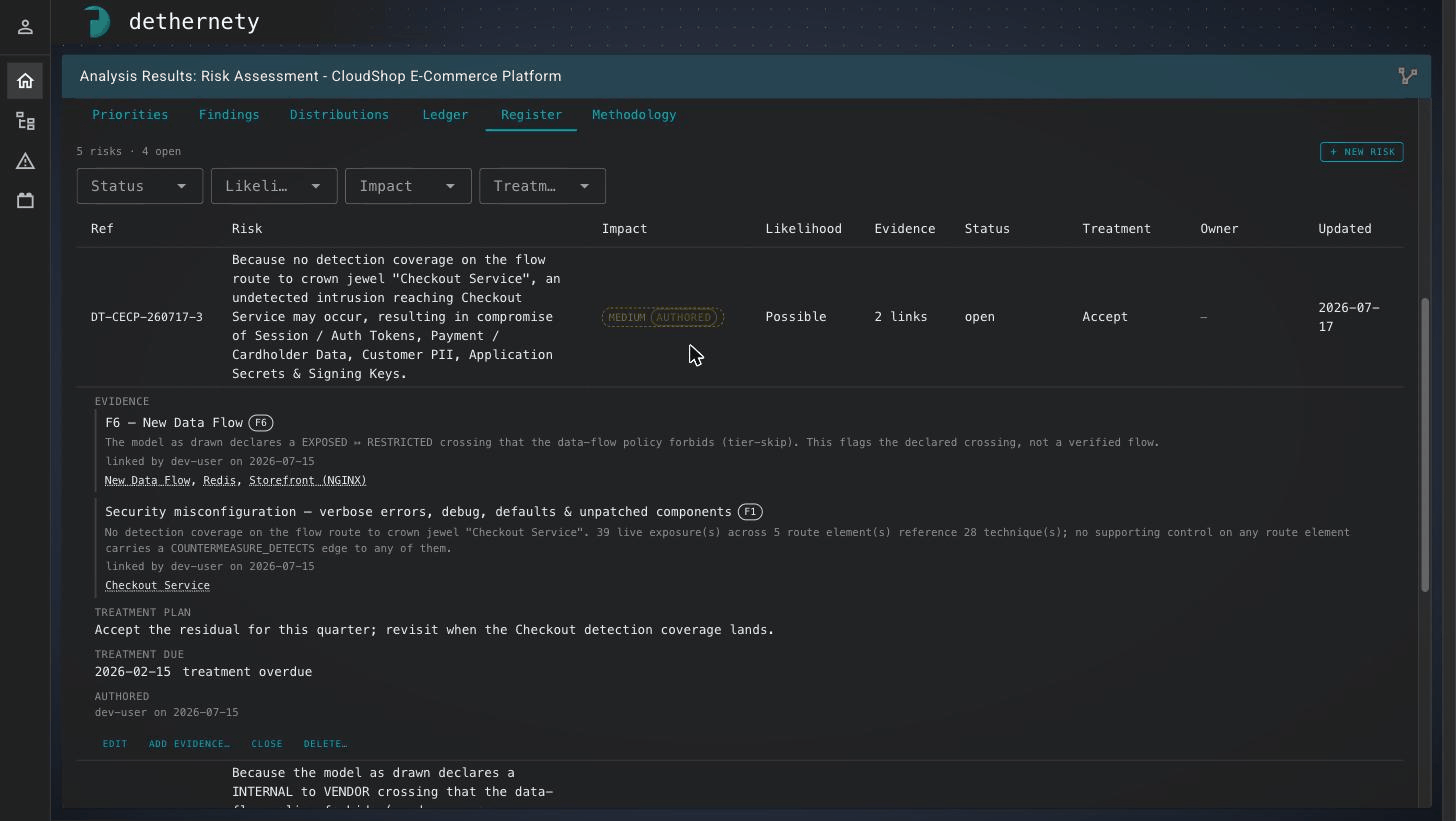
The Register tab. The count header and + New risk button sit above the Status / Likelihood / Impact / Treatment filters and the risk table. The expanded row shows a risk's linked evidence (here two findings, F6 and F1), its treatment plan and an overdue treatment date, and the row actions — Edit, Add evidence, Close, and Delete.
The table columns are:
| Column | What it shows |
|---|---|
| Ref | The risk's reference handle (see Reference handles). Shows a dash (—) if the risk has none. |
| Risk | The full three-part risk statement, rendered as one sentence. |
| Impact | Your assessed impact as a coloured band, or Unscored if you have not assessed it. |
| Likelihood | Your assessed likelihood, or unassessed. |
| Evidence | How many pieces of evidence are linked — for example 2 links. |
| Status | open, closed, or stale (needs review), plus a review overdue flag when the review date has passed. |
| Treatment | The recorded treatment decision. New risks show Undecided. |
| Owner | Who owns the risk, or a dash (—). |
| Updated | The date the risk was last changed. |
Note: The register is fetched separately from the rest of the report, so it is the one tab that can be genuinely loading, failed, or unavailable — not just empty. If it cannot load you get an honest message and a retry link, never a blank table pretending you have no risks. See Troubleshooting.
Author a risk
Every risk is authored through the same dialog, whether you start from a finding or from a blank slate. Focus always lands on the first statement field, never on Save, so writing your own words is the default path.
From a finding (recommended)
Starting from a finding pre-fills the risk with what the analysis already knows, so you spend your effort on judgment rather than transcription.
- On the Findings tab (or an element or exposure profile), find the finding you want to raise a risk about.
- Click its + Risk action. The authoring dialog opens with the mode selector set to This finding starts a new risk.
- The finding is attached as evidence automatically, and the statement fields and the Impact may be pre-filled as a draft — marked with a small draft tag and the note "seeded from the analysis — yours to change."
- Edit the drafted words to state the risk in your own terms. The draft tag on a field clears the moment you type in it, so you can always see which words are the analysis's and which are yours.
- Fill in the rest of the risk (assessment, owner, treatment) as described below, then click Create risk.
For more on findings and how they become evidence, see Findings.
From scratch
Some risks do not start from a single finding. You can author one from a blank slate and attach evidence later.
- On the Register tab, click + New risk.
- The dialog opens empty, with the note "from scratch — no evidence attached; feed it later from a finding or an element profile."
- Write the risk, assess it, and click Create risk.
- Attach evidence afterwards using the feed workflow in Add evidence to an existing risk.
The three-part statement
A risk in the register is never free prose. It is three separate parts that render into one fixed sentence:
Because <cause>, <event> may occur, resulting in <impact>.
You fill in three fields, each with its own prompt:
| Field | Prompt in the dialog | What to write |
|---|---|---|
| Cause | Because… (a present fact) | The condition that is true today — the thing the risk rests on. |
| Event | …may occur (the uncertain occurrence) | The uncertain thing that might happen because of that cause. |
| Impact | …resulting in (the effect on objectives) | The effect on your business or objectives if it does happen. |
All three are required, and a live preview under the fields shows the finished sentence as you type. Each part accepts up to 500 characters, shown by a counter. Because the three parts are stored separately, you can edit any one of them later without disturbing the others — the sentence is assembled fresh every time it is displayed, in the dialog, the table, and any report that quotes it.
Note: When you start from a finding that makes no impact claim of its own, the …resulting in field is left blank on purpose, with the hint "the analysis makes no impact claim on this finding — yours to state." You must fill it in before you can save — a risk statement is not complete without its impact.
Assess likelihood and impact
Below the statement, two selects capture your own assessment. Both are optional, and leaving either blank is a real, tracked state — unassessed — not a hidden zero.
| Axis | Values | Notes |
|---|---|---|
| Likelihood | Rare, Possible, Likely, Almost certain | Your probability judgment. The analysis does not compute likelihood — this is entirely yours. The field always starts blank. |
| Impact | Low, Medium, High, Critical | Your consequence judgment. When you author from a finding, a suggested value may be seeded here for you to change. |
These are your judgments, deliberately kept in the register's own vocabulary. They are not the same thing as the analysis's exposure or reachability wording elsewhere in the report — "exposed to the internet" is a computed fact about your model, not a statement that something is "Almost certain" to happen. The register never translates one into the other.
Risks that have both a likelihood and an impact are placed on the Risk Register matrix on the report; risks missing either axis are carried honestly in that card's count as unassessed rather than being guessed onto the grid. See Reading the Report for the matrix.
Owner, review date, and the other details
Open the Details (owner, review date, notes, treatment) section of the dialog for the remaining fields. All are optional.
| Field | What it is for |
|---|---|
| Owner | Free text naming who is accountable. The register models no assignment workflow — it is a label, not a hand-off. |
| Review by | A date (YYYY-MM-DD) when you plan to revisit the risk. Drives the review overdue marker. There is no reminder engine — the marker is the whole mechanism. |
| Notes | Free-form context, up to 2000 characters. |
| Treatment, Treatment plan, Treatment due | Your response decision and its plan — see Record a treatment. |
| Why this evidence? | An optional note recorded on the evidence link, frozen at the moment you link it. Available when creating or feeding a risk. |
| Reference prefix / Reference id | The reference handle — see Reference handles. |
Save stays disabled until the risk is valid, and the dialog always tells you why it is disabled — for example Save needs: cause, event, impact. Fix what it names and the button activates.
Link evidence
Evidence is what grounds a risk in your analysis. Each piece of evidence is a finding, exposure, or element from the report, attached to the risk as its basis.
- When you author from a finding, that finding is attached automatically. If several related findings fire on the same data flow, the dialog lists them with checkboxes and a note like "3 boundary-crossing findings fire on this flow — select the ones this risk is about" (with a select all shortcut). The finding you clicked + Risk on is always included and cannot be deselected.
- When you author from scratch, no evidence is attached at birth; you feed it later (see Add evidence to an existing risk).
Each linked piece of evidence is shown with its severity band as it stood at that moment.
The severity is captured at link time. When you link a finding, the register records the finding's severity as it is right then and keeps that frozen value on the link. It never quietly updates. That frozen value is exactly what lets the register tell you later — plainly, and on that risk's own row — when the finding has moved: "changed since linked: HIGH → MEDIUM." See When a risk needs review.
In an expanded risk row, each evidence link shows its label and finding type, the frozen sentence describing what you were looking at when you cited it, your optional rationale, and a provenance line — "linked by … on …" — recording who attached it and when.
Record a treatment
Every risk carries management's recorded response — modelled on the standard risk-treatment families. Set it with the Treatment select in the dialog's Details section.
| Treatment | What it records |
|---|---|
| Undecided | No decision has been made yet. This is the starting state for every new risk, and a legitimate choice to leave in place — the register tracks "no decision yet" honestly rather than pretending one exists. |
| Accept | You are carrying the risk deliberately. |
| Mitigate | You are reducing it with controls. |
| Transfer | You are shifting it elsewhere — for example, insurance or a third party. |
| Avoid | You are removing the exposure entirely. |
Two optional companions ride alongside the decision:
- Treatment plan — free prose describing how you will treat the risk (up to 2000 characters). The register never fills this from its own analysis; the words are always yours.
- Treatment due — a target date (YYYY-MM-DD). Like the review date, it drives an overdue marker (treatment overdue) and nothing more.
Note on "Undecided". Undecided is a first-class value, not an empty field. The Treatment select has no "clear" option, and every new risk starts as Undecided. This is deliberate: a board's count of risks still awaiting a decision depends on being able to tell "no decision yet" apart from "no data." When you record a real decision, the register stamps who decided it and when — an Undecided risk carries no such stamp.
The treatment you record is your management decision. It is separate from, and never merged with, whether the underlying finding has been dispositioned in the analysis (for example, accepted or affirmed on the Findings tab). A risk can carry a treatment, a finding disposition, both, or a deliberate mismatch — the report shows them side by side and leaves the judgment to you.
Reference handles
Every risk carries a reference handle — a human-friendly identifier you can quote in a ticket, an email, or a governance pack. A handle looks like DT-CS-260717-4: a prefix, the date it was created, and a number.
The handle is generated for you when you create the risk. You do not type it — but you can influence and later edit it:
- Setting the prefix at creation. The dialog's Reference prefix field (create only) seeds the prefix. Leave it blank to auto-generate one (the placeholder reads "auto — a DT-prefixed handle, or type your own"), or type your own using 1–12 characters from
A–Z,a–z,0–9, or-. - Editing the handle later. Open a risk, click Edit, and change the Reference id field — for example, to match an identifier from another system (a GRC tool, a risk committee's minutes). It must be unique within this model, and it cannot be cleared: a risk always keeps a handle once it has one.
A handle is a lookup, not a ranking. Treat the reference handle as a name you can search for, not as a position, a score, or a complete sequence:
- Gaps are normal. Deleting a risk leaves a gap in the numbers. This is expected — the numbers are not a contiguous count.
- A number can be reused. Deleting a risk and creating another the same day can reuse the same number.
- Two risks can, rarely, share a handle. If two risks are created in the very same instant they can end up with the same handle.
Because of this, the handle is a convenience, not the identity. The reliable identity of a risk is the risk record itself — it is unique, permanent, and never reused, and it is what any export keys on.
Add evidence to an existing risk
When you come across a new finding that belongs to a risk you have already written, feed the evidence to that existing risk instead of authoring a duplicate.
- Open the new finding (on the Findings tab, or an element or exposure profile) and click its + Risk action.
- In the dialog, choose This finding feeds an existing risk.
- Use the Add this evidence to… picker to choose the target risk.
- Confirm which evidence to attach, then click Add evidence.
The picker is built to put the most relevant risk first. It ranks your open risks in three tiers against the finding you are feeding:
- Risks that already have evidence on the same element.
- Risks that already have evidence of the same finding type.
- Everything else, newest first.
Each row shows the risk's impact band and cause on the first line, and its reference handle, owner, status, and evidence count on the second. Type in the picker to filter by the risk's cause, event, impact, owner, or reference handle.
Note: Feeding evidence attaches the finding and nothing more — it does not change the target risk's statement, assessment, or treatment. To change those, edit the risk from the register. The Add evidence… action on a register row is a signpost to this workflow: because the register tab has no finding in hand, it points you back to where the evidence lives.
Manage the register
Filter
Four filters sit above the table. Each is clearable, and they combine — a risk must match all active filters to show.
| Filter | Options |
|---|---|
| Status | Open, Closed |
| Likelihood | Rare, Possible, Likely, Almost certain, Unassessed |
| Impact | Low, Medium, High, Critical, Unassessed |
| Treatment | Undecided, Accept, Mitigate, Transfer, Avoid |
Choosing Unassessed for likelihood or impact is how you find the risks still waiting for a judgment. If the active filters match nothing, the table says so plainly — "0 of 4 risks match the active filters" — with a clear and show all link, so a narrowed-to-empty view is never mistaken for an empty register.
Tip: Clicking a cell on the report's Risk Register matrix opens this tab pre-filtered to that cell's open risks — the same filter controls, filled for you.
Open and close a risk
Closing a risk is a soft archive: the row stays, its history stays, and you can reopen it at any time. Use it for risks that are real but settled.
- Expand the risk row.
- Click Close. The status changes to closed.
- To bring it back, expand it again and click Reopen.
Closed risks drop out of the report's Risk Register matrix (which shows open risks only) but remain in the register table and its count.
Delete a risk
Deleting is permanent. Use it only for mistaken entries — for real-but-settled risks, use Close instead.
- Expand the risk row.
- Click Delete…. A confirmation appears: "permanent — removes the risk and its evidence links; no undo."
- Click confirm delete to remove the risk, or cancel to keep it.
Warning: Delete cannot be undone. There is no version history and no recycle bin — a deleted risk and its evidence links are gone. The two-step confirmation is your only safeguard, so read it before clicking through.
When a risk needs review
A risk's evidence is frozen at the moment you link it, but your analysis keeps moving. The register watches for the gap and raises quiet, information-only markers on the individual risk rows so you can act on them. None of these markers is an alarm, and none of them is the report's "your model changed" banner — they live entirely on the risk's own row.
Evidence that has moved (stale)
When a linked finding's severity has changed since you linked it, the risk's Status shows stale, and the expanded row names the move on the evidence line — for example changed since linked: HIGH → MEDIUM. This tells you the basis for the risk has shifted and the risk is worth another look. Re-open the risk, re-check your assessment, and update it if the change warrants it.
Expanded evidence lines can report a few other conditions, each worded to say exactly what is known and no more:
| Marker on the evidence line | What it means | What to do |
|---|---|---|
| changed since linked: HIGH → MEDIUM | The severity you froze at link time has since moved. | Re-check the risk against the current finding and update your assessment. |
| marked … on … by … | The underlying finding has been dispositioned in the analysis — for example accepted or ruled a false positive. (A finding a person has affirmed as real still counts as live evidence and does not show here.) | Decide whether the risk still stands now the finding has been answered. |
| no longer present in the current analysis (was HIGH) | The finding has dropped out of the current analysis. The frozen label keeps it named. | Re-link fresh evidence, or reconsider whether the risk still applies. |
| not evaluated by the current snapshot (regenerate) | Your current report predates the analysis that would have looked for this evidence. It was never checked — which is not the same as "gone." | Regenerate the report so the evidence can be evaluated. |
| this evidence link predates the current key format | An older link the register can no longer match up. | Review the risk and re-link its evidence if needed. |
Consider closing
When every finding behind a risk has been dispositioned or has dropped out of the analysis, the expanded row shows a single prompt: "every finding behind this risk has been dispositioned or removed — consider closing." This is a suggestion, never an action — closing a risk is always something you do yourself. A risk whose findings were all answered may still be a real risk you are carrying deliberately, so the decision stays yours.
Overdue dates
Two date-based markers appear when a date you set has passed:
- review overdue — shown beside the status when the Review by date is in the past.
- treatment overdue — shown beside the treatment due date in the expanded row when Treatment due is in the past.
Both are quiet markers. The register never nags on a schedule, and closing a risk is always your call — the markers simply surface work for you to pick up.
Risks recorded from Threat Patterns
If you also use Threat Patterns on this model, Threat Patterns can record risks in this register, both on its findings and on the exposures it shows. Each one arrives as a risk with that finding or exposure attached as its evidence. From then on it is a register risk like any other: you can edit its statement, assess it, give it an owner, close it, or delete it.
How they appear
Evidence from Threat Patterns carries a chip in the expanded row:
- Threat Patterns · high for a finding, showing the severity Threat Patterns gave the finding when it was recorded.
- Threat Patterns · exposure · high for an exposure, showing the exposure's severity when it was recorded. Besides the usual levels, an exposure's severity can read none or unscored.
That severity is on Threat Patterns' own scale. It is not one of this report's severity bands, and the register never compares the two.
You decide the treatment
A risk recorded from Threat Patterns starts as Undecided. Its treatment, including whether you accept it, is a management decision you record here, exactly as for a risk you wrote yourself: see Record a treatment. Threat Patterns records the finding or exposure; the decision stays with you.
What the evidence markers mean
This report cannot check Threat Patterns evidence against its own analysis, so each time the register loads it asks Threat Patterns whether each finding or exposure still holds. The answer can arrive a moment after the register appears. The evidence line repeats what Threat Patterns answered:
| Marker on the evidence line | What it means | What to do |
|---|---|---|
| (no marker) | Threat Patterns still shows it as it was recorded. | Nothing. |
| changed since linked: high → critical | The severity has moved since it was recorded. When only a finding's details moved, the line reads changed since linked: legs or confidence; for an exposure it reads changed since linked: name or who added it. | Re-check the risk against what Threat Patterns shows now and update your assessment. |
| no longer found by Threat Patterns (was high) | Threat Patterns no longer produces this finding on this model. | Open Threat Patterns to see why, then decide whether the risk still stands. |
| no longer on its element (was high); if it was raised again it is a new item: link the new one | The exposure is no longer on the element it was recorded on: it was removed, or the element was deleted. | See When an exposure comes back. |
| marked … on … by … | The exposure has been dispositioned on the platform, for example accepted or ruled a false positive. (An exposure a person has affirmed as real still counts as live evidence and does not show here.) | Decide whether the risk still stands now the exposure has been answered. See Exposures that were already dispositioned. |
| no current Threat Patterns run on this model | There is no Threat Patterns run to check a finding against: Threat Patterns has not been run on this model yet, or every run on it was made by an earlier version of Threat Patterns. | Run Threat Patterns on this model. |
| from Threat Patterns: open Threat Patterns to check it | The register could not get an answer, for example because Threat Patterns is not installed or the check failed. Nothing is known about the evidence either way. | Open Threat Patterns and check it there. |
If the Threat Patterns run a finding was recorded from no longer exists, Threat Patterns answers from the model's latest run, and the line says so: judged on the latest Threat Patterns run. An exposure is checked against your model as it is now, not against a run, so this never applies to one.
Each of these markers makes the risk stale, worth a review, with one exception: a disposition the exposure already had when the risk was recorded (see below). The four markers that say a finding is no longer found, an exposure is no longer on its element, there is no current Threat Patterns run, or the register could not ask never lead to consider closing: none of them is a reason to suggest closing a risk. A disposition can, as described next.
When an exposure comes back
An exposure keeps its identity for as long as it stands. If it is removed and later raised again, the platform treats it as a new item, even when it looks the same. The link on your risk still points at the old one, so it reads no longer on its element rather than quietly reading as current again. If the exposure is back, link the new one to this risk from Threat Patterns.
Exposures that were already dispositioned
You may record a risk on an exposure your team has already dispositioned, for example one you accepted. That disposition is the reason the risk exists, so the register treats it as expected: the evidence line still shows marked … on … by …, but it does not make the risk stale and never leads to consider closing. A disposition made after the risk was recorded counts like any other: it makes the risk stale, and if everything behind the risk has been dispositioned or removed, the register suggests consider closing.
In the exports
- The register CSV has an
evidence_sourcescolumn, afterrisk_id, naming where each risk's evidence comes from by module identifier:dethermine-risk-assessment(Risk Assessment),dethermine-threat-patterns(Threat Patterns), or both separated by;. It is empty for a risk with no evidence. Findings and exposures from Threat Patterns both count asdethermine-threat-patterns. - In the Risk Committee report, the evidence column of such a risk adds "Includes Threat Patterns findings, judged by Threat Patterns", whether the risk cites a Threat Patterns finding or an exposure, so a reader knows the report did not judge that evidence itself.
Exporting the register
The whole register can be exported as a spreadsheet-ready file for import into GRC tooling. That export — and its column layout and safety rules — is covered in Stakeholder Reports.
Troubleshooting
The Register tab shows "The register could not be loaded."
The register is fetched separately from the rest of the report, and that request failed. Click the retry link to try again. Nothing is lost — the register is only being read, not written.
The tab says "The risk register is unavailable — the host platform is too old to read it."
Your platform version does not support the register. The report's other tabs still work; ask your administrator about upgrading to enable the register.
I got "This risk was changed elsewhere — your unsaved edits were replaced with the current values."
Someone else edited the same risk while you had it open. The dialog reloaded the current values so you do not overwrite their change. Re-apply your edit on top of the refreshed values and save again.
I got "This risk was deleted in another session."
The risk you were editing was deleted elsewhere and can no longer be saved. Copy anything you still need from the dialog, then click Cancel.
The empty state says "No risks authored yet."
The register genuinely holds no risks. Author your first one from a finding's + Risk action, from an element profile, or with + New risk on this tab.
What to read next
- Reading the Report — the computed findings, matrices, and the "your model changed" banner the register never triggers.
- Findings — the findings you link as evidence, and how to raise a risk from one.
- Record a treatment and Stakeholder Reports — recording your decisions and exporting the register for GRC.
- Methodology and Trust — why the register is deliberately isolated from the computed numbers.
- FAQ — common questions across the Risk Assessment product.
- Threat Patterns — the analysis whose findings can be recorded in this register.