
Findings
A finding is a specific observation the Risk Assessment makes about your threat model. Every finding is grounded in something concrete you have declared — an element, a data flow, a trust zone, a crown jewel — and it points you at a place worth a closer look. This guide is the reference to open when you see a finding and want to know what it means and what to do about it.
The Risk Assessment surfaces ten kinds of finding, in two families:
- Control-gap findings (F1–F5) ask whether the protections around a risk are present where the architecture says they should be. They look along the routes an attacker's activity could travel and at the elements on your entry surface, and they flag places where an expected detection, isolation, or mitigating control is missing.
- Architectural and data-flow, or "zoning", findings (F6–F10) ask whether the flows between your trust zones respect the zoning policy your model expresses. They judge the model as you have drawn it — the declared zones, conduits, planes, and domains — and flag crossings the policy forbids or would want you to review.
Every finding type carries a short code (F1 through F10) and a display name, both shown on screen. This guide uses the same codes and names so you can move between the product and this reference without translation.
A finding is an invitation to investigate, never a verdict. It tells you "look here, and here is why." It does not claim your system is broken, and — just as important — a control sitting near a finding is never treated as proof the finding is closed. See What a finding is, and is not below.
For the trust rationale behind every claim a finding makes — why the ratings are bands and counts rather than invented scores, and why the wording is deliberately cautious — see Methodology and Trust. For how to scan the Findings surface in the report and drill from a finding into the elements it names, see Reading the Report.
How to read a finding
Whichever family it belongs to, a finding gives you three things.
- The element (or flow) it concerns. Every finding names the specific element, data flow, or boundary it fired on. In the report those names are clickable and take you straight to the element's risk profile.
- Its evidence. A plain-language sentence stating the declared facts that triggered the finding — the route, the zone pair, the data class, the missing control. Zoning findings always phrase this as a statement about the model as drawn ("the model declares a crossing the policy forbids"), never as a claim that a live flow was observed and verified.
- Its severity band. One of Critical, High, Medium, Low, or Unscored, shown as an outlined chip. The band tells you how loud the finding is — not a probability, and not a monetary loss. The band vocabulary is defined in Reading the Report.
The two families set their band differently, and deliberately so:
- A control-gap finding (F1–F5) takes its band from your data — it is the worst band among the exposures that triggered it. A finding that fired on a Critical exposure is Critical.
- A zoning finding (F6–F10) takes a fixed band for its policy class — the severity of a forbidden crossing is a property of the policy, not of any score. (The one exception is noted under F6.)
The three states of a finding type
Each of the ten finding types reports one of three states, shown distinctly on its panel so you never have to guess which one you are looking at:
- Instances found — the check ran and flagged one or more places (for example, "3 found"). Expand the panel to see each instance.
- Checked — none found — the check ran cleanly against the current model and flagged nothing. This is a positive result: assurance that the condition was looked for and is not present.
- Not computable — the check could not run, and the panel states why (for example, no crown jewels are declared, there are no entry origins, or the model has no recognized zones). This is not the same as a clean pass. As the report puts it: absence of a result is not absence of risk.
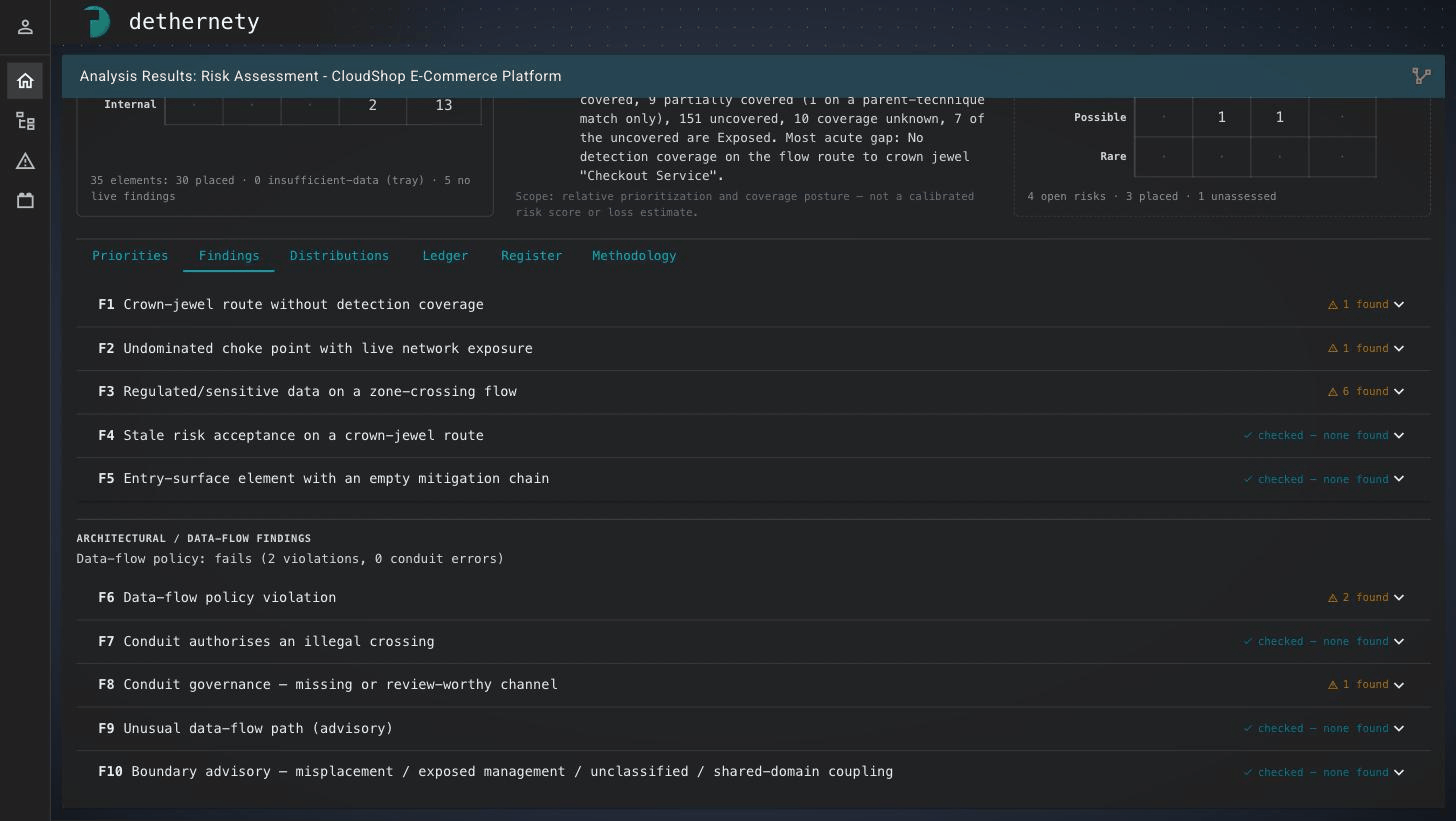
The Findings tab. Each finding type shows its code, name, and state marker on the right — an amber "⚠ N found" when the check surfaced something, or a cyan "✓ checked — none found" when it ran and found nothing. The two groups are the control-gap findings (F1–F5) and the architectural / data-flow findings (F6–F10).
What a finding is, and is not
The Risk Assessment is built to be the honest reading of your model, and the wording of every finding is constrained to keep it that way. Two rules matter when you interpret one:
- A finding does not say your system is broken. It says the model, as declared, contains a pattern worth examining. Whether it is a real gap, an accepted trade-off, or a modeling oversight is for you to decide.
- A nearby control is never counted as a fix. Having guidance, or having a control somewhere in the vicinity, is not the same as moving a rating. If you add or reconfigure a control in response to a finding, that is a change to your model — you must re-run the analysis (Recreate) to see its effect. Until you do, the finding stands. The reasoning behind this is in Methodology and Trust.
Because of this, the actions a finding offers are always the same three shapes: investigate it, change the model (add or configure a control, or correct a zone declaration) and re-run, or accept it into the risk register as a tracked risk with an owner and a rationale. That last path is described in The Risk Register; every finding in the report carries a + risk action that seeds a register entry from the finding as evidence.
Throughout this guide, a live exposure means one that has not been set aside by a decision (a disposition); a dispositioned finding — for example one you affirmed or accepted — is kept in the record but excluded from the running totals.
The ten findings at a glance
| Finding | Family | What it tells you |
|---|---|---|
| F1 — Crown-jewel route without detection coverage | Control gap | A modeled route reaches a crown jewel, and no element along it has a detection control on its exposures' ATT&CK techniques. |
| F2 — Undominated choke point with live network exposure | Control gap | A choke point that all routes to a protected asset pass through carries a network-facing exposure and no control isolates its ATT&CK techniques. |
| F3 — Regulated/sensitive data on a zone-crossing flow | Control gap | A flow carrying regulated or sensitive data crosses a trust boundary with a live exposure and no detection or isolation on its ATT&CK techniques. |
| F4 — Stale risk acceptance on a crown-jewel route | Control gap | An element on a route to a crown jewel carries a previously accepted risk that may no longer be valid. |
| F5 — Entry-surface element with an empty mitigation chain | Control gap | An element on your entry surface has a live exposure and no control matched to its ATT&CK techniques. |
| F6 — Data-flow policy violation | Zoning | A modeled flow crosses between trust zones in a way the zoning policy forbids. |
| F7 — Conduit authorises an illegal crossing | Zoning | A conduit you declared would itself sanction a crossing the policy forbids. |
| F8 — Conduit governance — missing or review-worthy channel | Zoning | A permitted crossing lacks a declared conduit to authorize it, or is a sanctioned channel worth review. |
| F9 — Unusual data-flow path (advisory) | Zoning | A crossing that is allowed but unusual enough to confirm — for example, data leaving a restricted zone. |
| F10 — Boundary advisory — misplacement / exposed management / unclassified / shared-domain coupling | Zoning | A boundary-level placement concern, judged per boundary rather than per flow. |
The subsections below take each finding in turn, in the order the report presents them.
Control-gap findings (F1–F5)
These five look at the protections around your risks. They run over the same picture of your entry surface and the routes through your model that drives the report's likelihood ratings, so a finding and a rating can never disagree about where the exposed surface is.
F1 · Crown-jewel route without detection coverage
What it means. There is a modeled flow route from your entry surface to a crown jewel, and not one element along that route carries a detection control against the relevant ATT&CK techniques. If something moved along that path, nothing on it is declared to detect those techniques.
Why it appears. You have marked an asset as a crown jewel; a modeled data flow reaches it from an entry origin; and none of the elements on that route declare a detection control against the ATT&CK techniques behind the route's exposures. The finding's band is the worst exposure encountered along the route.
What to do. Walk the route the finding names and decide whether detection is genuinely absent or simply unmodeled. If it is absent, add monitoring or detection to an element on the path and re-run the analysis. If the route is acceptable as-is, accept it into the risk register so the decision is recorded against an owner.
F2 · Undominated choke point with live network exposure
What it means. A single component that every modeled route to a protected asset must pass through — a choke point — carries a live, network-facing exposure, and no control isolates its ATT&CK techniques. A choke point is the natural place to contain a threat; this one has no isolation declared against those techniques.
Why it appears. The topology of your flows makes this component a choke point in front of one or more protected assets; it has a live exposure reachable over the network; and it declares no isolation control on its ATT&CK techniques. Because a choke point guards valuable assets, the finding's impact is lifted to the level of the most valuable asset behind it, so it is not buried beneath the component's own rating.
What to do. Treat the choke point as a containment opportunity: consider isolation or segmentation, then re-run the analysis. If isolation is not feasible, accept the finding into the register.
A limitation to know. This check considers components only. An isolation gap that lives on a data flow itself — rather than on a component — surfaces as F3, not here. If you expect a choke-point finding and do not see one, check F3 for the same crossing.
F3 · Regulated/sensitive data on a zone-crossing flow
What it means. A data flow that carries regulated or sensitive data crosses a trust boundary, carries a live exposure, and has neither a detection nor an isolation control on its exposures' ATT&CK techniques. Sensitive data is moving between zones with nothing declared to watch or contain those techniques on the crossing.
Why it appears. The flow handles data you have marked as regulated or sensitive; its two endpoints sit in different declared zones; the flow carries a live exposure; and no detection or isolation control is declared against its exposures' ATT&CK techniques.
What to do. Review the crossing: confirm the data classification, then add detection or isolation to the flow and re-run, or re-route the data. If the crossing is intended and governed elsewhere, accept it into the register. A flow that fires F3 will often also fire an architectural finding (F6, F8, or F9) on the same crossing; when it does, each finding notes the other with "also fires … on this flow" so you can see the full picture from either side.
F4 · Stale risk acceptance on a crown-jewel route
What it means. An element on a route to a crown jewel carries a risk you previously accepted, and that acceptance is now stale — the model has changed since the acceptance was recorded, so the decision may no longer reflect reality. This is the one finding that deliberately surfaces an already-accepted item, precisely because it sits on a sensitive route.
Why it appears. You recorded a risk acceptance on the element; the model has since changed in a way that marks that acceptance stale; and the element lies on a modeled route to a crown jewel.
What to do. Re-review the acceptance against the current model. Re-affirm it if it still holds, update its rationale, or record a fresh decision. Because the item is already in your disposition history, the goal here is to keep that history honest rather than to add a control.
F5 · Entry-surface element with an empty mitigation chain
What it means. An element on your entry surface — a component an attacker could reach first, because it faces an untrusted or public zone or is an external entry point — has a live exposure and no control matched to its ATT&CK techniques. The first thing an attacker meets has no matched control in front of those techniques.
Why it appears. The element is an entry origin; it carries a live exposure; and no control at any level matches that exposure's ATT&CK techniques. The finding's band is the worst such bare exposure on the element.
What to do. This is usually the highest-value place to add a control. Introduce a mitigating control against the exposure and re-run the analysis, or accept the exposure into the register if it is a known and owned trade-off.
Architectural and data-flow (zoning) findings (F6–F10)
These five judge the flows between your trust zones against the zoning policy your model expresses. They rest on one principle: the zones you declare are authoritative. The Risk Assessment never re-classifies a boundary you have zoned — a link between two zones is a policy question, not a re-rating. Consequently every zoning finding describes the model as drawn: it means "the model, as declared, encodes this crossing", never "we verified this flow can occur." Where a zone was filled in by policy default rather than declared by you, the report marks it (defaulted) so you can tell the difference.
The report also shows a single Data-flow policy line summarizing this family — passes, passes with warnings/advisories, fails, or not evaluated. That rollup and how to read it live in Reading the Report.
F6 · Data-flow policy violation
What it means. A modeled flow crosses between two trust zones in a way the zoning policy forbids — for example, a flow that skips a trust tier, or a cross-domain flow into a restricted zone.
Why it appears. The declared zones of the flow's two endpoints, together with the direction of the crossing and the domains involved, match a pattern the policy classifies as a violation.
What to do. Re-examine the architecture. If the zones are mislabeled, correct them and re-run. If the crossing is real, redesign the flow or route it through a sanctioned conduit. If it is a deliberate exception, accept it into the register.
Severity. F6 is High, raised to Critical when one of the two boundaries directly holds a crown jewel or another critical-impact asset — a forbidden crossing that touches your most valuable assets is the loudest thing this family can say.
F7 · Conduit authorises an illegal crossing
What it means. A conduit you declared — a sanctioned channel between zones — would itself authorize a crossing the policy forbids. The problem is the authorizing channel, judged on its own endpoints before any flow uses it.
Why it appears. The conduit's two endpoints, by their declared zones, form a crossing the policy classifies as illegal. The conduit is inspected in its own right, so this fires even if no flow currently travels through it. Its band is High.
What to do. Review the conduit. Remove it, narrow its endpoints, or correct the zone declarations it connects, then re-run. If the channel is intended, accept the finding into the register with your justification.
F8 · Conduit governance — missing or review-worthy channel
What it means. A crossing the policy permits in principle is either not authorized by any declared conduit, or is a sanctioned channel worth a second look. This is a governance nudge rather than a violation.
Why it appears. The crossing is allowed by the trust gradient, but no declared conduit covers it — a missing channel (Medium) — or it is a sanctioned outbound (egress) or management-plane crossing that the policy surfaces for review (Low).
What to do. For a missing channel, declare the conduit that governs the crossing so your model records the intent, then re-run. For a review-worthy channel, confirm it is expected. Either way, accept it into the register if you want the decision tracked.
F9 · Unusual data-flow path (advisory)
What it means. A crossing that is not forbidden but is unusual enough to be worth confirming — for example, data leaving a restricted zone, or a control-plane flow reaching into a restricted zone.
Why it appears. The crossing matches an advisory pattern in the policy: allowed, but atypical. Its band is Low.
What to do. Confirm the flow is intended. If it is, no change is needed; you may accept it into the register to note that it was reviewed. If it is not, correct the flow or the zones.
F10 · Boundary advisory — misplacement / exposed management / unclassified / shared-domain coupling
What it means. A concern about the placement of a boundary itself, rather than about any single flow. F10 is computed per boundary and covers four distinct situations, each with its own severity:
- Under-protected asset (Critical) — a declared crown jewel sits directly in an exposed zone, with nothing between it and the outside.
- Exposed management plane (Medium) — a management plane is declared in a public or exposed zone, where administrative access should not live.
- Unclassified boundary (Unscored) — a boundary that holds assets but declares no recognized zone anywhere in its ancestry, so the policy cannot reason about its flows.
- Shared-domain coupling (Low) — a declared domain tag couples a protected boundary with an externally reachable one, blurring a separation you have otherwise drawn.
Why it appears. Each sub-kind reads directly from your declarations: the placement of a crown jewel, the plane and zone of a boundary, the absence of a zone, or a domain tag shared across a trust divide. The shared-domain check depends on your model declaring domain tags; where it does not, that dimension is simply not evaluated.
What to do. The remedy follows the sub-kind: move the crown jewel to a more protected zone; move management access off the exposed zone; classify the boundary by declaring its zone (an unclassified boundary is a modeling gap, not a clean result); or review the shared-domain coupling. Re-run the analysis after any model change, or accept the item into the register.
When this family cannot run. Zoning analysis needs boundaries and recognized zones to reason about. On a model with none, the whole family reports not computable with that reason, rather than a misleading clean pass.
Turning a finding into a tracked risk
Investigating a finding and changing the model are the fast paths, but many findings should also become tracked risks — owned, rated, and reviewed on a cadence — whether or not you fix them immediately. Every finding in the report offers a + risk action that opens a new register entry pre-filled with the finding as its evidence, so the link between the observation and the decision is preserved. See The Risk Register for how to author a risk, cite a finding as evidence, and keep that evidence in step with the model as it changes.
Related guides
- Reading the Report — how to scan the Findings surface, read the assurance states, and drill into the elements a finding names.
- The Risk Register — turning a finding into a tracked risk and citing it as evidence.
- Methodology and Trust — why findings are worded the way they are, and what the bands and states do and do not claim.
- Stakeholder Reports — how findings appear in exported reports for different audiences.
- Getting Started · Overview · FAQ