
Stakeholder Reports and Exports
One assessment produces reporting for every audience you answer to. From a single generated Risk Assessment you can hand your board a one-page brief, give your risk committee the full reconciliation, keep the complete technical detail for your own team, and export the underlying data into your GRC tool — without ever re-running anything or reconciling one document against another.
Every one of these outputs is drawn from the same frozen assessment. A number on the board brief is the same number on the technical report, because both are filtered and framed from one point-in-time truth, not recomputed. That is what makes the reporting defensible: the framing changes for the reader, the numbers never do.
This guide covers the three audience-tiered reports, how to preview and download them, the governance disclaimers they carry, and the two data exports (JSON and the register CSV). For how the numbers are produced and why they can be trusted, see Reading the Report and Methodology and Trust. For how risks get into the register in the first place, see The Risk Register — this guide is only about getting them out.
Before you export
The Export menu lives in the report header, next to the title. It becomes available once you have generated a report. The menu is unavailable — and the button explains why on hover — in three cases:
- No report yet. Generate the assessment first.
- A run is in flight. A Generate or Recreate is still finishing; wait for it to complete.
- Pending dispositions. You have triaged findings that are not yet reflected in the numbers. Recreate to fold them in before exporting, so the report you send matches the decisions you made.
The three report tiers
Open the Export menu and you will see five items. The first three are formatted reports, each written for a specific reader:
| Report | Who it's for | What it contains | What it omits |
|---|---|---|---|
| Board / Executive | Your board, executive committee, or anyone who needs the posture in one page | The headline takeaway; the four-state coverage counts (always with denominators, never a bare percentage); the uncovered/exposed top-band count; the inherent likelihood × impact matrix; the four governance disclaimers; a summary of your authored risks with the top open risks by assessed impact; and the governance flags (risks rated below the computed severity, risks accepted via disposition, open risks with no decided treatment) | Finding codes, MITRE technique references, the full findings ledger, architectural-findings detail, analyst appendices, and methodology parameters — only an "as of · methodology version" line is carried |
| Risk Committee | Your risk committee, second line, or internal audit liaison | Everything the board sees, plus: the full four-state coverage and finding-type summary, conservatism-reducing parameter flags, the full scope-and-limitations panel, the complete authored register with evidence liveness, the acceptances, and the reconciliations between what management recorded and what the analysis computed (see below) | Raw knowledge-graph and reasoning appendices, and per-technique guidance |
| Technical (full) | Your security team and the analyst who owns the assessment | The complete assessment rendered in full, including finding codes, every finding across every element, and all analyst appendices (reasoning, coverage evidence, framework guidance) | Nothing — this is the full detail |
The reconciliations in the Risk Committee report are the reason it exists as its own tier. It places management's recorded decisions next to the analysis's computed facts and shows where they differ, rather than hiding the gap:
- Treatment vs. disposition. A treatment is a management decision you author on a risk (accept, mitigate, transfer, avoid). "Accepted via disposition" is a computed fact about a finding's evidence. A risk may carry one, both, or a deliberate mismatch — the report shows them side by side and frames the difference as a conversation to have, not an error to fix.
- The divergence view. Where you rated a risk's impact below the model's computed severity band (frozen at the moment you linked the evidence), the committee report surfaces it, so a deliberately downgraded risk is visible rather than buried.
Evidence from Threat Patterns. A risk can cite findings that Threat Patterns recorded in your register (see Risks recorded from Threat Patterns). This report does not judge those findings itself: their liveness is Threat Patterns' answer. So the evidence column of such a risk adds the note "Includes Threat Patterns findings, judged by Threat Patterns". Threat Patterns severities are on their own scale, so they never enter the divergence view.
Which report to send whom
- Send the Board / Executive report to anyone who needs the answer, not the working. It is one page, register-led, and carries the disclaimers that make it safe to forward.
- Send the Risk Committee report to a second-line or audit audience who needs to see the reconciliations and challenge the ratings.
- Keep the Technical (full) report for the people who will act on individual findings.
One truth, filtered and framed
All three reports are built from the same frozen assessment plus your current register. No tier recalculates anything — each one shows a different selection of the same underlying values. This has one guarantee that matters for governance:
A number can never disagree across the three reports. A coverage count on the board brief is the same coverage count on the technical report. A screenshot of any tier can be trusted against any other.
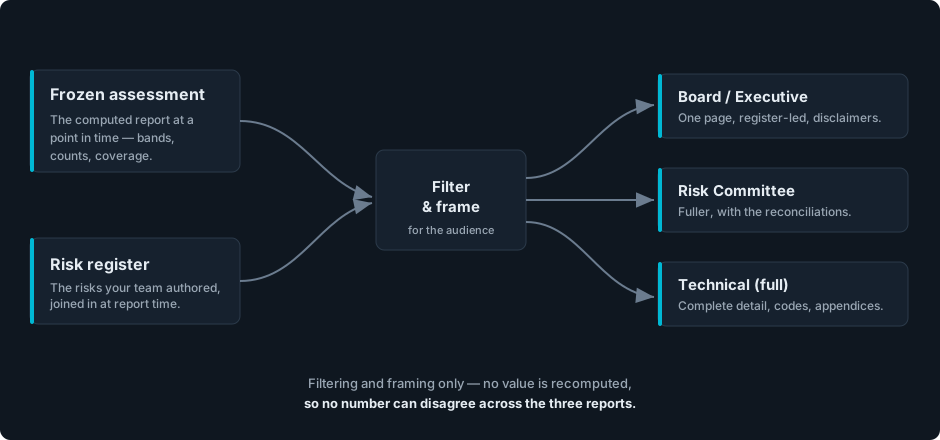
One frozen assessment and its risk register feed a single filter-and-frame step. The Board, Risk Committee, and Technical reports are framings of that one source — nothing flows back to be recomputed.
Because the tiers share one source, the board brief is a strict subset of what the technical report shows — never a re-derivation that could drift.
Preview and download a report
Governance tiers open a preview first
The Board / Executive and Risk Committee reports open a short Export preview before they download. This is a governance sign-off step, not a rendered page of the report. It shows you:
- The as-of timestamp the report will carry.
- A Shows and Omits list — the exact scope claim the reader will see, so you confirm what you are and are not sending.
- A staleness line if the underlying model looks like it has changed since the assessment was generated.
- How many of your open authored risks rest on evidence that is now flagged stale, so nothing is forwarded on quietly outdated grounds.
Click Download to produce the report, or Cancel to back out. If the model looks meaningfully stale, the preview promotes a Recreate action to the front and relabels the download Download stale copy — so confirming a stale export is never easier than refreshing it first. A report downloaded while stale is stamped as such inside the file, so a forwarded copy cannot pass itself off as current.
The Download button stays disabled until your register has finished loading. This prevents a board report from asserting "no open authored risks" about a register that simply had not been read yet.
Direct downloads
The Technical (full) report, the JSON (full snapshot) export, and the Register (CSV) export download immediately with no preview — they carry no board-facing framing to confirm.
A report is a point-in-time snapshot
Every download captures the assessment and register as they are at that moment. It does not update itself afterward. If you change the model and Recreate, or edit the register, download again to reflect the change. The as-of timestamp on each report tells the reader exactly which moment it represents.
The governance disclaimers
The Board / Executive and Risk Committee reports open with four plain-language disclaimers. They are not legal boilerplate bolted on at the end — they state precisely what the report claims and, just as importantly, what it does not:
| Disclaimer | In plain terms |
|---|---|
| Point-in-time | This is a snapshot of the modeled posture at a moment, not a live or deployed-state scan. The environment may have changed since it was generated. |
| Relative, not absolute | Likelihood, impact, and severity are ordinal comparisons drawn from the modeled structure — not probabilities, financial loss estimates, or a single risk score. |
| Coverage reflects what's modeled | Coverage describes the controls represented in the model, not their real-world operating effectiveness. An uncovered finding may mean a control is simply not modeled yet, not that it is absent. |
| No assurance opinion | The report is not an audit, review, or certification. It expresses no assurance and does not verify the existence, design, or operating effectiveness of any control. It reflects the model as drawn, not the environment as operated. |
Why this helps you. These disclaimers are what make the report defensible to a board or an auditor. They ensure the report never claims more than it can support, so a reader can trust exactly what the numbers mean and nothing beyond it. The "no assurance" statement rides all three tiers — including the footer of the technical report — so the most detailed, most assertive artifact never carries a weaker caveat than the one-page board brief. The full meaning behind each disclaimer, and the trust model it comes from, is covered in Methodology and Trust.
Data exports
Two menu items give you the data itself rather than a formatted report.
JSON (full snapshot)
JSON (full snapshot) downloads the complete assessment data, plus a provenance footer recording when and under what methodology it was generated. Use it when you want to feed the assessment into your own tooling, archive a machine-readable record, or build a custom view. It is the raw source the three reports are framed from.
Register (CSV)
Register (CSV) downloads your risk register as a flat spreadsheet, ready to import into your GRC tool, Excel, or Google Sheets. It carries one row per risk and includes both open and closed risks, so closing a risk preserves it in your history rather than erasing it — the status is a column your importer can filter on.
Each row carries the fields your GRC tool needs to key on and report from:
| Field | What it holds |
|---|---|
Reference handle (ref_id) | The human-facing GRC reference, such as DT-CS-260717-4. Convenient to read, but it can be empty on older risks, edited by an operator, or in rare cases reused — so do not rely on it as your only key. |
| Source | Always authored — a built-in reminder that every register row is management opinion, not a computed finding. |
| Status | open or closed. |
| Cause, event, impact, and the full statement | The three-part risk statement, both as separate parts and as the assembled sentence. |
| Owner | The named owner, or empty. |
| Assessed likelihood and assessed impact | Your hand-assigned ratings, or empty where a risk is not yet assessed. |
| Treatment, treatment plan, treatment due | The recorded management decision and its plan and due date. The treatment always carries a word (undecided when no decision has been made) so "no decision yet" is never confused with "no data". |
| Review-by date, notes | The review date and free-text notes, or empty. |
| Evidence count | How many pieces of evidence support the risk — a plain count, carrying no verdict. |
| Created by, created at | Who first recorded the risk, and when. |
Stable id (risk_id) | The immutable, never-empty, globally unique identifier. Key and de-duplicate on this, not on the reference handle. |
Evidence sources (evidence_sources) | The last column, after risk_id: which products the risk's evidence comes from, as module identifiers, sorted and separated by ; — dethermine-risk-assessment (Risk Assessment), dethermine-threat-patterns (Threat Patterns), or dethermine-risk-assessment;dethermine-threat-patterns. Empty for a risk with no evidence. A record of where the evidence came from, carrying no verdict. |
A safety note on formulas. If any authored text (an owner name, a note) begins with a character a spreadsheet reads as a formula — =, +, -, or @ — it is automatically neutralized so it opens as plain text and cannot execute when someone opens the file. This is a deliberate protection against a malicious cell running in a colleague's spreadsheet. It slightly changes those values (a leading apostrophe is added), so treat the exported value as authoritative; if you match on the reference handle as an exact key, strip a single leading apostrophe first.
Encoding. The file is written so that accented characters and other Unicode open correctly in Excel and Google Sheets, with no garbled text — no manual import settings needed.
The register CSV deliberately carries no computed severity, coverage, or liveness rollup. Those live in the JSON export and the Risk Committee report; the CSV is the authored record.
Troubleshooting
| Symptom | What to check |
|---|---|
| The Export button is greyed out. | You have not generated a report yet, a run is in flight, or you have pending dispositions. Hover the button for the exact reason; Recreate if it asks you to. |
| The preview's Download button stays disabled. | The register is still loading. Wait for it to finish — the button enables once the register is read. |
| The preview shows a staleness warning. | The model looks changed since the report was generated. Use Recreate first for an accurate report, or download the stale copy knowingly — it will be stamped as stale. |
| A reference handle looks off in the CSV (a leading apostrophe, or a gap in the numbering). | The apostrophe is the formula-safety protection above. Numbering gaps mean a risk was deleted; a repeated number means a delete-then-recreate. Always key on the stable id, not the handle. |
| The board report says "no open authored risks" but you have some. | The register had not finished loading. Reopen the report tab, let the register load, and export again. |
What to read next
- Reading the Report — what the numbers on screen mean.
- The Risk Register — how to author, rate, and close the risks that flow into these exports.
- Methodology and Trust — the full meaning of the disclaimers and why the reporting is defensible.
- FAQ — common questions and error messages.